How Detection Works
PromptDuty scans text in real-time as users type prompts into AI chat interfaces. The extension uses pattern matching and machine learning to identify sensitive data before it's sent to AI services.
Scan
The extension monitors text input fields on supported AI sites and scans for patterns matching sensitive data types.
Classify
Detected data is classified by type (SSN, credit card, email, etc.) and assigned a severity level.
Act
Based on your configuration, the extension takes action: block, mask, warn, or allow the data.
Detected Data Types
PromptDuty detects a wide range of sensitive data types commonly found in business communications:
Personal Identifiers
| Data Type | Examples | Default Severity |
|---|---|---|
| Social Security Numbers | 123-45-6789, 123 45 6789 | Critical |
| National ID Numbers | UK NI, Canadian SIN, etc. | Critical |
| Passport Numbers | Various formats by country | Critical |
| Driver's License | State/province-specific formats | High |
Financial Information
| Data Type | Examples | Default Severity |
|---|---|---|
| Credit Card Numbers | Visa, Mastercard, Amex, etc. | Critical |
| Bank Account Numbers | IBAN, routing numbers | Critical |
| Tax IDs | EIN, VAT numbers | High |
Contact Information
| Data Type | Examples | Default Severity |
|---|---|---|
| Email Addresses | john.doe@company.com | Medium |
| Phone Numbers | +1 (555) 123-4567 | Medium |
| Physical Addresses | Street addresses with zip codes | Medium |
Authentication & Secrets
| Data Type | Examples | Default Severity |
|---|---|---|
| API Keys | sk_live_xxx, AKIA..., etc. | Critical |
| Passwords | password=, pwd:, etc. | Critical |
| Private Keys | -----BEGIN RSA PRIVATE KEY----- | Critical |
| Connection Strings | Database URLs with credentials | Critical |
Health Information (HIPAA)
| Data Type | Examples | Default Severity |
|---|---|---|
| Medical Record Numbers | MRN patterns | Critical |
| Health Insurance IDs | Policy numbers | High |
| Prescription Information | Drug names with dosages | High |
Severity Levels
Each data type is assigned a severity level that determines the default action taken:
Critical
Data that could lead to identity theft, financial fraud, or major security breaches. Examples: SSN, credit cards, API keys, passwords.
Default action: Block
High
Sensitive personal or business data that should be protected but may have legitimate uses. Examples: Driver's license, tax IDs, health insurance IDs.
Default action: Mask
Medium
Personal contact information that may be appropriate to share in some contexts. Examples: Email addresses, phone numbers, physical addresses.
Default action: Warn
Low
Information that is generally safe but may warrant awareness. Examples: Names, dates, general numbers.
Default action: Allow
Detection Actions
When sensitive data is detected, PromptDuty can take one of four actions:
| Action | Behavior | User Experience |
|---|---|---|
| Block | Prevents the prompt from being sent | User sees a modal explaining what was blocked and why |
| Mask | Replaces sensitive data with placeholders | Data is replaced (e.g., 123-45-6789 → [SSN REDACTED]) |
| Warn | Shows a warning but allows sending | User sees a warning and can choose to proceed or edit |
| Allow | Logs the detection but takes no action | No interruption; activity is logged for audit |
Configuring Rules
Detection rules can be configured at the user level through the extension popup:
Open Extension Settings
Click the PromptDuty icon in your browser toolbar, then click the Settings tab.
Find Detection Rules
Scroll to the Detection Rules section where you'll see dropdowns for each severity level.
Set Actions
For each severity level, choose the action you want: Block, Mask, Warn, or Allow.
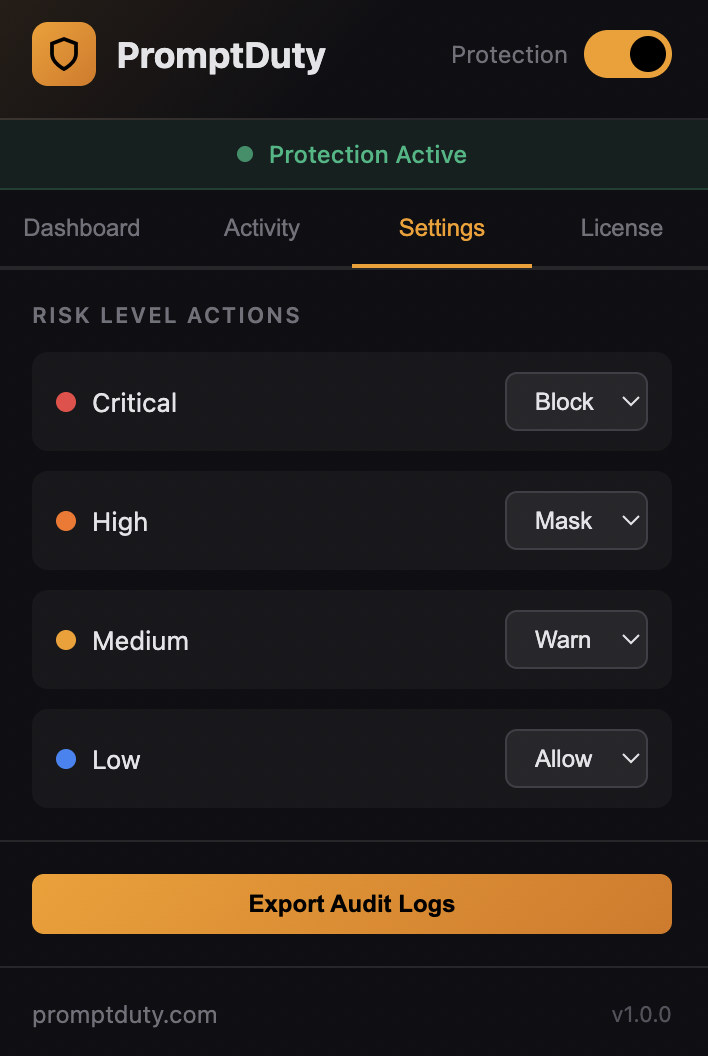
On Enterprise plans, administrators can set organization-wide detection rules that apply to all users. These rules can be deployed via Intune or Google Workspace policies.
Example Configurations
Maximum Security (Recommended for Healthcare, Finance)
Block all sensitive data from being sent to AI tools:
| Severity | Action |
|---|---|
| Critical | Block |
| High | Block |
| Medium | Mask |
| Low | Warn |
Balanced (Default)
Block critical data, mask sensitive data, warn on contact info:
| Severity | Action |
|---|---|
| Critical | Block |
| High | Mask |
| Medium | Warn |
| Low | Allow |
Monitor Only
Log all detections without blocking (useful for initial rollout):
| Severity | Action |
|---|---|
| Critical | Warn |
| High | Warn |
| Medium | Allow |
| Low | Allow |
For organizations subject to HIPAA, PCI-DSS, GDPR, or other regulations, we recommend using the Maximum Security configuration to ensure compliance. Consult your compliance team before adjusting these settings.
If you need assistance configuring detection rules for your organization, contact our support team.