Overview
PromptDuty provides comprehensive logging and reporting capabilities to help your organization meet compliance requirements. Every interaction with AI tools is logged, allowing you to demonstrate that sensitive data is being protected.
Essentials: 30-day log retention, basic export
Professional: 1-year log retention, compliance reports
Enterprise: Unlimited retention, SIEM integration, custom reports
Activity Logs
PromptDuty logs every detection event with detailed information for audit purposes:
| Field | Description |
|---|---|
| Timestamp | UTC timestamp of when the detection occurred |
| User ID | Unique identifier for the user (hashed for privacy) |
| AI Service | Which AI tool was being used (ChatGPT, Claude, etc.) |
| Data Types | Types of sensitive data detected (SSN, credit card, etc.) |
| Severity | Severity level of the detected data |
| Action Taken | What PromptDuty did (blocked, masked, warned, allowed) |
| User Response | Whether user proceeded after warning (if applicable) |
PromptDuty does not log the actual sensitive data or full prompt content. Logs contain only metadata about detections to protect user privacy while still meeting audit requirements.
Viewing Logs in the Extension
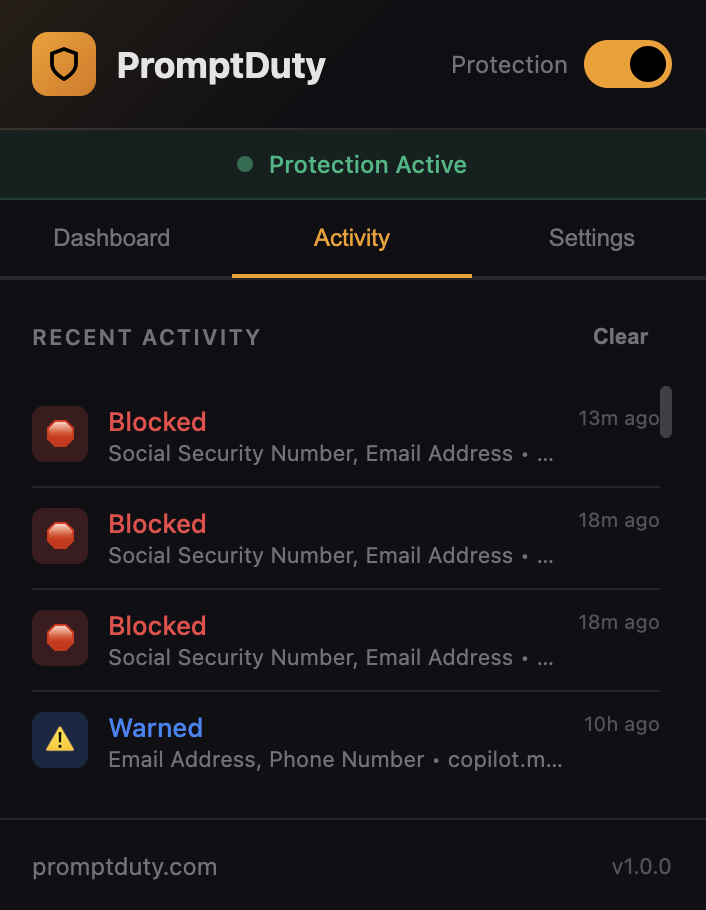
Users can view their own activity log in the extension popup:
Open the Extension
Click the PromptDuty icon in your browser toolbar.
Go to Activity Tab
Click the Activity tab to see recent detections.
Review Events
Each event shows the action taken, data types detected, and timestamp.
Exporting Logs
Export activity logs for compliance audits and reporting:
From the Extension
Open Extension Settings
Click the PromptDuty icon and go to the Activity tab.
Click Export
Click the Export button to download logs as a JSON file.
Export Format
Exported logs are in JSON format with the following structure:
{
  "exportDate": "2024-01-15T10:30:00Z",
  "extensionVersion": "1.0.0",
  "stats": {
    "scanned": 1250,
    "blocked": 12,
    "masked": 45,
    "warned": 89,
    "allowed": 1104
  },
  "logs": [
    {
      "id": "log_abc123",
      "timestamp": "2024-01-15T10:25:00Z",
      "site": "chat.openai.com",
      "action": "masked",
      "findings": [
        { "type": "email", "severity": "medium" },
        { "type": "phone", "severity": "medium" }
      ]
    }
  ]
}
Organization-Wide Reports (Professional & Enterprise)
Administrators can generate organization-wide compliance reports from the dashboard:
Access Dashboard
Go to promptduty.com/dashboard and log in.
Navigate to Reports
Click Compliance Reports in the sidebar.
Select Report Type
Choose from available report templates or create a custom date range.
Generate & Download
Click Generate Report to create a PDF or CSV export.
Compliance Frameworks
PromptDuty helps organizations meet requirements for various compliance frameworks:
SOC 2
PromptDuty supports SOC 2 Type II compliance by providing:
- Access Controls — License-based authentication ensures only authorized users access the service
- Data Classification — Automatic detection and classification of sensitive data types
- Audit Logging — Comprehensive logs of all data protection actions
- Monitoring — Real-time alerting on security events
GDPR
For organizations handling EU personal data:
- Data Minimization — Prevents unnecessary sharing of personal data with AI services
- Right to Access — Users can export their own activity logs
- Data Protection — Automatic masking of personal identifiers
- Breach Prevention — Blocking high-risk data before it's transmitted
HIPAA
For healthcare organizations:
- PHI Protection — Detection and blocking of Protected Health Information
- Audit Controls — Detailed logging of all access attempts
- Access Management — Organization-level controls over AI tool usage
- Risk Analysis — Reports showing data exposure attempts
PCI-DSS
For organizations handling payment card data:
- Cardholder Data Protection — Automatic detection of credit card numbers
- Access Restriction — Blocking transmission of card data to AI services
- Audit Trail — Logging of all detection events
Log Retention
Log retention periods vary by plan:
| Plan | Retention Period | Notes |
|---|---|---|
| Essentials | 30 days | Local logs only |
| Professional | 1 year | Cloud backup, compliance reports |
| Enterprise | Unlimited | Custom retention, SIEM integration |
Need longer retention on Essentials or Professional plans? Contact us to discuss custom retention options.
SIEM Integrations
Enterprise customers can integrate PromptDuty logs with their existing security infrastructure:
Supported Platforms
- Splunk — Real-time log forwarding via HTTP Event Collector
- Microsoft Sentinel — Azure Log Analytics integration
- Datadog — Log forwarding via API
- Custom Webhook — Send events to any HTTP endpoint
Configuration
SIEM integrations are configured in the admin dashboard. Contact your account manager or our support team to enable integrations for your organization.
For questions about compliance reports or to request a custom integration, contact our team.